How I Easily Set My Links to Open in a New Tab for My Ghost.org Blog
It's really easy to set up opening links in new windows/tabs for a Ghost blog. This really short post will tell you how.
The Quick Version
Copy this code:
<script>
(function() {
    Array.from(document.querySelectorAll("a")).filter(a => {
        return a.hostname && a.hostname !== location.hostname
    }).forEach(a => a.setAttribute('target', '_blank'))
})();
</script>
Head to your Ghost settings, Code injection, paste it into site footer and hit save:
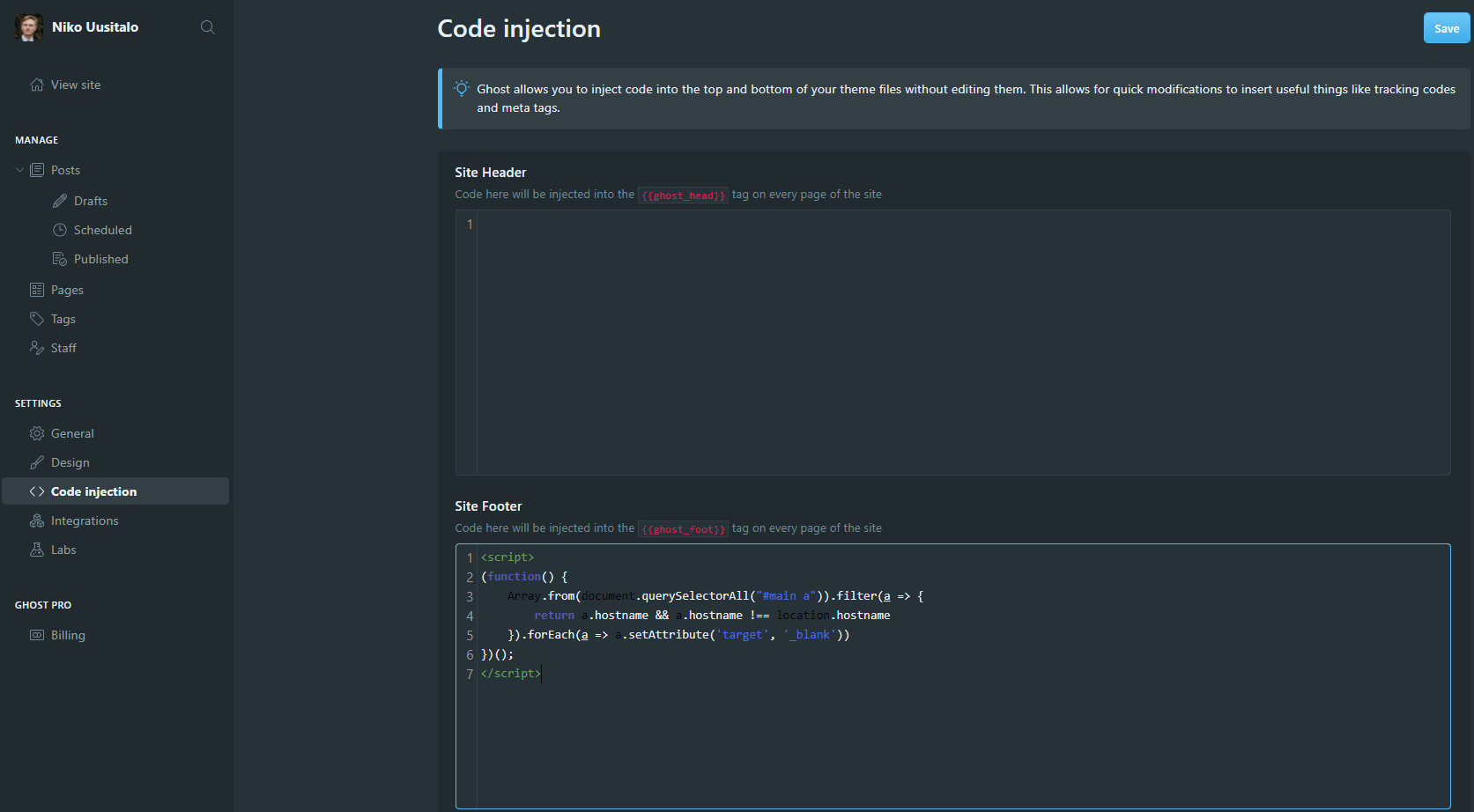
Done! (Might need to do a hard refresh or wait until the cache is cleared to see the change).
This opens links to your own blog in the same window/tab, but links to other websites in a new tab/window.
The Longer Version
So this is a vanilla version of a popular Ghost forum post.
I changed two things about it:
- Changed it to an IFFE
- Made new tabs open in the (normal/default) _self context
- Made it vanilla
But, for the really old browser Internet Explorer it will quietly not work. Because old IE doesn't work with Array.from(), see more at MDN Web Docs. Just for the very small amount of users (<2% as of 2020) who might visit your site, they won't get the luxury of new links in another tab.